
This vignette demonstrates the pmxhelpr forest plot
workflow for visualizing the univariate impact of covariate effects in a
model on the integrated model output (e.g. exposure metrics, response
metrics, ratio to reference)
The pipeline mirrors the VPC and dose-proportionality workflows. Where to start depends on the data in hand:
-
Wide simulation output (one row per scenario per
replicate, metrics as columns): reshape it with
df_forest_preprocess(), then continue below. -
Long simulation output (one row per scenario per
replicate per): call
plot_forest(draws, metric = )for a single plot, ordf_forest()once and pass its result toplot_forest()for several metrics or layouts. -
Summary output: wrap it as a
forest_statsobject and callplot_build_forest()(see “Building aforest_statsby hand” in?plot_build_forest).
options(scipen = 999, rmarkdown.html_vignette.check_title = FALSE)
library(pmxhelpr)
library(dplyr, warn.conflicts =  FALSE)
library(ggplot2, warn.conflicts =  FALSE)
Background
A univariate forest plot is a graphical model application used to visualize the impact of intrinsic and extrinsic participant factors (i.e., covariates) on integrated model outputs (e.g., exposure metrics, response metrics, ratios of exposure or response) under test conditions relative to reference conditions.
The typical workflow involves establishing the reference scenario (i.e., the vector of covariates at the reference level for each individual covariate) and test scenarios, each differing in only one covariate value from the reference scenario.
The model is then applied to generate predictions under each scenario with uncertainty and/or variability arising from unique sets of fixed effects model parameters in each simulation sampled from the uncertainty in parameter estimation (i.e., sampled from a multivariate normal distribution with the mean vector set to the vector of final fixed effects parameter estimates).
The output from the simulation is a distribution of “typical” (fixed effects only) model outputs, from which the median (50th percentile) is interpreted as the estimate of central tendency and quantiles (e.g., 2.5th-97.5th, 5th-95th) are interpreted as the confidence interval around the central tendency (e.g., 95% CI, 90% CI)
The bioequivalence criteria (0.8 to 1.25) provide a conventional reference range for interpretation of covariate impact on exposure.
Data
This vignette uses two internal datasets built using the internal
data_sad dataset and the internal PK model
(pkmodel).
-
data_sad_pkforest_sim: raw exposure metric simulation output for N = 500 replicates. Dosing of 200 mg once daily to steady state. Exposure metrics are summarized to one row per scenario (M) per replicate (N) resulting in a dataset of length M x N (6 scenarios * 500 replicates = 3000). Example input dataset fordf_forest_preprocess()
glimpse(data_sad_pkforest_sim)
#> Rows: 3,000
#> Columns: 9
#> $ ID   <dbl> 1, 1, 1, 1, 1, 1, 1, 1, 1, 1, 1, 1, 1, 1, 1, 1, 1, 1, 1, 1, 1, 1,…
#> $ SIM  <dbl> 1, 2, 3, 4, 5, 6, 7, 8, 9, 10, 11, 12, 13, 14, 15, 16, 17, 18, 19…
#> $ WTBL <dbl> 70, 70, 70, 70, 70, 70, 70, 70, 70, 70, 70, 70, 70, 70, 70, 70, 7…
#> $ FOOD <dbl> 0, 0, 0, 0, 0, 0, 0, 0, 0, 0, 0, 0, 0, 0, 0, 0, 0, 0, 0, 0, 0, 0,…
#> $ DOSE <dbl> 200, 200, 200, 200, 200, 200, 200, 200, 200, 200, 200, 200, 200, …
#> $ CMAX <dbl> 844.8669, 822.4267, 868.3378, 773.0414, 913.1536, 612.5367, 1002.…
#> $ CMIN <dbl> 200.0502, 272.0832, 258.2627, 157.6926, 181.3835, 213.1723, 202.5…
#> $ AUC  <dbl> 12006.29, 13463.48, 13488.21, 10383.56, 12138.47, 10439.84, 12970…
#> $ CAVG <dbl> 500.2621, 560.9784, 562.0089, 432.6482, 505.7697, 434.9935, 540.4…-
data_sad_pkforest: pre-processed simulated exposure metrics. Exposure metrics are gathered from columns into rows, one row per scenario (M) per replicate (N) per metric (K), resulting in a dataset of length M x N x K (6 scenarios * 500 replicates * 8 metrics = 24000). Example output dataset fromdf_forest_preprocessand example input dataset fordf_forest().
glimpse(data_sad_pkforest)
#> Rows: 24,000
#> Columns: 9
#> $ ID        <dbl> 1, 1, 1, 1, 1, 1, 1, 1, 1, 1, 1, 1, 1, 1, 1, 1, 1, 1, 1, 1, …
#> $ SIM       <dbl> 1, 1, 1, 1, 1, 1, 1, 1, 2, 2, 2, 2, 2, 2, 2, 2, 3, 3, 3, 3, …
#> $ WTBL      <dbl> 70, 70, 70, 70, 70, 70, 70, 70, 70, 70, 70, 70, 70, 70, 70, …
#> $ FOOD      <dbl> 0, 0, 0, 0, 0, 0, 0, 0, 0, 0, 0, 0, 0, 0, 0, 0, 0, 0, 0, 0, …
#> $ DOSE      <dbl> 200, 200, 200, 200, 200, 200, 200, 200, 200, 200, 200, 200, …
#> $ metric    <chr> "CMAX", "CMIN", "AUC", "CAVG", "CMAXRATIO", "CMINRATIO", "AU…
#> $ value     <dbl> 844.8669, 200.0502, 12006.2897, 500.2621, 1.0000, 1.0000, 1.…
#> $ cov_name  <chr> "Reference", "Reference", "Reference", "Reference", "Referen…
#> $ cov_level <chr> "Reference", "Reference", "Reference", "Reference", "Referen…
Relevant variables in these datasets include: + ID
identifies the scenarios (1 = reference, 2 = fed, 3 = 50 kg, 4 = 60 kg,
5 = 80 kg, 6 = 90 kg) + SIM is the replicate counter +
metric holds the the exposure metric names, which include
both absolute (CMAX, CMIN, AUC,
CAVG) and test/reference ratios (CMAXRATIO,
CMINRATIO, AUCRATIO, CAVGRATIO) +
value holds the exposure metric values +
cov_name holds the name of the univariate covariate varied
(Reference, FOOD, WTBL) +
cov_level holds the level label of the univariate covariate
varied (Reference, Fed, 50 kg,
60 kg, 80 kg, 90 kg)
It also carries a cov_level_ref attribute naming each
covariate’s reference.
Preprocessing with df_forest_preprocess()
df_forest_preprocess() is the entry point from a
simulation output to the forest plot pipeline. It reads the scenario
structure from the covariate columns in the raw simulation output.
Key arguments are as follows:
-
data: data.frame, simulation output dataset for processing -
metric_vars: character vector, names of metric variables indata -
cov_vars: character vector, names of covariate variables indata -
cov_val_ref: named vector, covariate name: reference value pairs defining the reference conditions -
cov_labels: list, covariate value:label pairs or labeling function
simsum <- df_forest_preprocess(
  data_sad_pkforest_sim,
  metric_vars   = c("CMAX", "CMIN", "AUC", "CAVG"),
  cov_vars      = c("FOOD", "WTBL"),
  cov_val_ref = c(FOOD = 0, WTBL = 70),
  cov_labels    = list(
    FOOD = c("0" = "Fasted", "1" = "Fed"),
    WTBL = function(x) paste(x, "kg")
  )
)
glimpse(simsum)
#> Rows: 24,000
#> Columns: 9
#> $ ID        <dbl> 1, 1, 1, 1, 1, 1, 1, 1, 1, 1, 1, 1, 1, 1, 1, 1, 1, 1, 1, 1, …
#> $ SIM       <dbl> 1, 1, 1, 1, 1, 1, 1, 1, 2, 2, 2, 2, 2, 2, 2, 2, 3, 3, 3, 3, …
#> $ WTBL      <dbl> 70, 70, 70, 70, 70, 70, 70, 70, 70, 70, 70, 70, 70, 70, 70, …
#> $ FOOD      <dbl> 0, 0, 0, 0, 0, 0, 0, 0, 0, 0, 0, 0, 0, 0, 0, 0, 0, 0, 0, 0, …
#> $ DOSE      <dbl> 200, 200, 200, 200, 200, 200, 200, 200, 200, 200, 200, 200, …
#> $ metric    <chr> "CMAX", "CMIN", "AUC", "CAVG", "CMAXRATIO", "CMINRATIO", "AU…
#> $ value     <dbl> 844.8669, 200.0502, 12006.2897, 500.2621, 1.0000, 1.0000, 1.…
#> $ cov_name  <chr> "Reference", "Reference", "Reference", "Reference", "Referen…
#> $ cov_level <chr> "Reference", "Reference", "Reference", "Reference", "Referen…
Every column that is not a metric passes through, so simulation
inputs such as ID, WTBL, FOOD and
DOSE stay available for filtering and faceting
downstream.
This function call is exactly how the shipped dataset
data_sad_pkforest is built, so the two are the same frame.
The rest of the vignette works from simsum to follow the
workflow which would be used in a real worked forest plot workflow.
identical(simsum, data_sad_pkforest)
#> [1] TRUE
Each covariate’s reference label is attached as an attribute, ready
to pass to df_forest() as cov_level_ref.
ref_levels <- attr(simsum, "cov_level_ref")
ref_levels
#>     FOOD     WTBL
#> "Fasted"  "70 kg"
Reference Conditions
The reference condition is defined by the cov_val_ref
argument, which takes a vector of covariate name:reference value pairs.
df_forest_preprocess() labels cov_name and
cov_level as "Reference" (the
cov_name_ref argument) in the rows of the dataset with the
reference values of every covariate.
ref <- filter(simsum, cov_name == "Reference")
unique(ref$cov_name)
#> [1] "Reference"
unique(ref$cov_level)
#> [1] "Reference"
unique(ref$FOOD)
#> [1] 0
unique(ref$WTBL)
#> [1] 70
Every other scenario must differ from the reference in a univariate
manner (i.e., by exactly one covariate value), and that covariate
becomes the rows cov_name, with its labeled value as
cov_level. No scenario identifier column or separate lookup
table is needed, as the covariate combination in the dataset defines the
scenario.
Matching is on the character form of the value, so a numeric column and a character reference value still line up. A scenario that varies two covariates at once has no single covariate to attribute the change to, so it aborts. Factorial designs are out of scope.
factorial_sim <- data_sad_pkforest_sim
factorial_sim$FOOD[factorial_sim$ID == 6] <- 1   # 90 kg *and* fed

df_forest_preprocess(
  factorial_sim,
  metric_vars   = "AUC",
  cov_vars      = c("FOOD", "WTBL"),
  cov_val_ref = c(FOOD = 0, WTBL = 70)
)
#> Error in `df_forest_preprocess()`:
#> ! every non-reference scenario must differ from the reference in exactly one covariate; these differ in more than one: FOOD = 1, WTBL = 90. `df_forest_preprocess()` does not support factorial scenario designs.
Ratios
Test-to-Reference ratios are derived automatically for each metric
producing a within-replicate test/reference ratio named
<metric><ratio_suffix>.
Because the parameter set is shared across scenarios within a replicate, uncertainty common to both test and reference cancels in the ratio.
ratio = FALSE emits the absolute metrics alone, and
ratio_suffix renames the ratio metrics.
df_forest_preprocess(
  data_sad_pkforest_sim,
  metric_vars   = "AUC",
  cov_vars      = c("FOOD", "WTBL"),
  cov_val_ref = c(FOOD = 0, WTBL = 70),
  ratio_suffix  = "RAT"
) %>%
  distinct(metric)
#>   metric
#> 1    AUC
#> 2 AUCRAT
Labels
cov_labels accepts a list of key:value pairs to define
labels for each covariate, one entry per covariate, or a labeling
function applied to the values. A value with no label falls back to its
character form with a warning, which is what happens below for the fed
level.
df_forest_preprocess(
  data_sad_pkforest_sim,
  metric_vars   = "AUC",
  cov_vars      = c("FOOD", "WTBL"),
  cov_val_ref = c(FOOD = 0, WTBL = 70),
  cov_labels    = list(FOOD = c("0" = "Fasted"))
) %>%
  distinct(cov_name, cov_level)
#> Warning: `cov_labels` has no entry for these covariate values: FOOD = 1. They
#> are labeled by their character value.
#>    cov_name cov_level
#> 1 Reference Reference
#> 2      FOOD         1
#> 3      WTBL        50
#> 4      WTBL        60
#> 5      WTBL        80
#> 6      WTBL        90
Computing summary statistics with df_forest()
df_forest() is the summary function which produces a
class tagged object ready for rendering as a forest plot.
The only required argument is data. The column-name
arguments default to the conventions df_forest_preprocess()
emits:
-
metric_name_var: column of metric names, defaultmetric -
metric_value_var: column of metric values, defaultvalue -
cov_name_var: column of covariate names, defaultcov_name -
cov_level_var: column of covariate levels, defaultcov_level
Every row of a (metric, covariate, level) group is
aggregated, so no replicate index column (e.g., SIM) is
needed.
forest_obj <- df_forest(simsum)
forest_obj
#> <forest_stats>
#>   stats: 48 rows x 13 columns
#>   config: metric_name_var = metric, metric_value_var = value, cov_name_var = cov_name, cov_level_var = cov_level, ci = 0.9, sigdigits = 3, cov_name_ref = Reference, cov_level_ref = NULL
#>
#>   head(stats, 3):
#>   metric  cov_name cov_level       est        lo       hi   n est_label
#> 1   CMAX Reference Reference  861.3751  741.2410 1005.205 500       861
#> 2   CMAX      FOOD       Fed 1465.1054 1180.1763 1830.221 500      1465
#> 3   CMAX      WTBL     50 kg 1118.5361  936.4438 1306.034 500      1119
#>   lo_label hi_label          ci_label is_ref       layout
#> 1      741     1005   861 (741, 1005)   TRUE consolidated
#> 2     1180     1830 1465 (1180, 1830)  FALSE         both
#> 3      936     1306  1119 (936, 1306)  FALSE         both
#>
#>   Use `x$stats` for the full data.frame.
The stats slot holds one row per plotted point, in
plotting order: est, lo, and hi,
their formatted labels (ci_label combines them for tables),
the draw count n, is_ref for the reference
rows, and layout (see Where the reference row is
drawn). Edit est_label, lo_label, or
hi_label to change the plotted text.
forest_obj$stats
#>       metric  cov_name cov_level           est            lo            hi   n
#> 1       CMAX Reference Reference   861.3750994   741.2410080  1005.2045867 500
#> 2       CMAX      FOOD       Fed  1465.1054176  1180.1762553  1830.2213691 500
#> 3       CMAX      WTBL     50 kg  1118.5361190   936.4437765  1306.0338117 500
#> 4       CMAX      WTBL     60 kg   971.2402766   824.2664189  1129.1458559 500
#> 5       CMAX      WTBL     80 kg   776.4423820   669.8907596   916.7885283 500
#> 6       CMAX      WTBL     90 kg   708.0895493   608.5112952   841.5354644 500
#> 7       CMIN Reference Reference   219.0686436   157.6645590   287.2615988 500
#> 8       CMIN      FOOD       Fed   818.1375026   573.4613217  1128.5121716 500
#> 9       CMIN      WTBL     50 kg   269.1555134   187.3158389   375.0697115 500
#> 10      CMIN      WTBL     60 kg   241.3125053   172.7303956   327.6239892 500
#> 11      CMIN      WTBL     80 kg   200.8846609   143.8317810   261.7982474 500
#> 12      CMIN      WTBL     90 kg   185.3940547   135.0522034   249.6487099 500
#> 13       AUC Reference Reference 12540.1499642 10481.3622800 14629.1085550 500
#> 14       AUC      FOOD       Fed 28815.2687976 23413.5097890 35996.7028666 500
#> 15       AUC      WTBL     50 kg 16187.3034385 13481.2322820 19372.8077113 500
#> 16       AUC      WTBL     60 kg 14110.3919678 11835.1395435 16475.0464049 500
#> 17       AUC      WTBL     80 kg 11328.0537406  9468.8424024 13333.9102429 500
#> 18       AUC      WTBL     90 kg 10337.0855959  8685.3364436 12300.9044300 500
#> 19      CAVG Reference Reference   522.5062485   436.7234283   609.5461898 500
#> 20      CAVG      FOOD       Fed  1200.6361999   975.5629079  1499.8626194 500
#> 21      CAVG      WTBL     50 kg   674.4709766   561.7180118   807.2003213 500
#> 22      CAVG      WTBL     60 kg   587.9329987   493.1308143   686.4602669 500
#> 23      CAVG      WTBL     80 kg   472.0022392   394.5351001   555.5795935 500
#> 24      CAVG      WTBL     90 kg   430.7118998   361.8890185   512.5376846 500
#> 25 CMAXRATIO Reference Reference     1.0000000     1.0000000     1.0000000 500
#> 26 CMAXRATIO      FOOD       Fed     1.7029977     1.4446801     2.0214743 500
#> 27 CMAXRATIO      WTBL     50 kg     1.2976226     1.2166269     1.3887267 500
#> 28 CMAXRATIO      WTBL     60 kg     1.1265144     1.0938047     1.1622069 500
#> 29 CMAXRATIO      WTBL     80 kg     0.9019662     0.8779759     0.9253633 500
#> 30 CMAXRATIO      WTBL     90 kg     0.8234991     0.7828402     0.8642331 500
#> 31 CMINRATIO Reference Reference     1.0000000     1.0000000     1.0000000 500
#> 32 CMINRATIO      FOOD       Fed     3.8487735     2.8681897     4.9713206 500
#> 33 CMINRATIO      WTBL     50 kg     1.2426439     1.0660589     1.4360467 500
#> 34 CMINRATIO      WTBL     60 kg     1.1051264     1.0304508     1.1806703 500
#> 35 CMINRATIO      WTBL     80 kg     0.9164507     0.8656326     0.9727320 500
#> 36 CMINRATIO      WTBL     90 kg     0.8481978     0.7619381     0.9482848 500
#> 37  AUCRATIO Reference Reference     1.0000000     1.0000000     1.0000000 500
#> 38  AUCRATIO      FOOD       Fed     2.3164392     2.0044530     2.6485638 500
#> 39  AUCRATIO      WTBL     50 kg     1.2916101     1.1870389     1.4069578 500
#> 40  AUCRATIO      WTBL     60 kg     1.1243808     1.0817207     1.1693195 500
#> 41  AUCRATIO      WTBL     80 kg     0.9034349     0.8732801     0.9342181 500
#> 42  AUCRATIO      WTBL     90 kg     0.8260290     0.7749029     0.8797958 500
#> 43 CAVGRATIO Reference Reference     1.0000000     1.0000000     1.0000000 500
#> 44 CAVGRATIO      FOOD       Fed     2.3164392     2.0044530     2.6485638 500
#> 45 CAVGRATIO      WTBL     50 kg     1.2916101     1.1870389     1.4069578 500
#> 46 CAVGRATIO      WTBL     60 kg     1.1243808     1.0817207     1.1693195 500
#> 47 CAVGRATIO      WTBL     80 kg     0.9034349     0.8732801     0.9342181 500
#> 48 CAVGRATIO      WTBL     90 kg     0.8260290     0.7749029     0.8797958 500
#>    est_label lo_label hi_label             ci_label is_ref       layout
#> 1        861      741     1005      861 (741, 1005)   TRUE consolidated
#> 2       1465     1180     1830    1465 (1180, 1830)  FALSE         both
#> 3       1119      936     1306     1119 (936, 1306)  FALSE         both
#> 4        971      824     1129      971 (824, 1129)  FALSE         both
#> 5        776      670      917       776 (670, 917)  FALSE         both
#> 6        708      609      842       708 (609, 842)  FALSE         both
#> 7        219      158      287       219 (158, 287)   TRUE consolidated
#> 8        818      573     1129      818 (573, 1129)  FALSE         both
#> 9        269      187      375       269 (187, 375)  FALSE         both
#> 10       241      173      328       241 (173, 328)  FALSE         both
#> 11       201      144      262       201 (144, 262)  FALSE         both
#> 12       185      135      250       185 (135, 250)  FALSE         both
#> 13     12500    10500    14600 12500 (10500, 14600)   TRUE consolidated
#> 14     28800    23400    36000 28800 (23400, 36000)  FALSE         both
#> 15     16200    13500    19400 16200 (13500, 19400)  FALSE         both
#> 16     14100    11800    16500 14100 (11800, 16500)  FALSE         both
#> 17     11300     9500    13300  11300 (9500, 13300)  FALSE         both
#> 18     10300     8700    12300  10300 (8700, 12300)  FALSE         both
#> 19       523      437      610       523 (437, 610)   TRUE consolidated
#> 20      1201      976     1500     1201 (976, 1500)  FALSE         both
#> 21       674      562      807       674 (562, 807)  FALSE         both
#> 22       588      493      686       588 (493, 686)  FALSE         both
#> 23       472      395      556       472 (395, 556)  FALSE         both
#> 24       431      362      513       431 (362, 513)  FALSE         both
#> 25      1.00     1.00     1.00    1.00 (1.00, 1.00)   TRUE consolidated
#> 26      1.70     1.44     2.02    1.70 (1.44, 2.02)  FALSE         both
#> 27      1.30     1.22     1.39    1.30 (1.22, 1.39)  FALSE         both
#> 28      1.13     1.09     1.16    1.13 (1.09, 1.16)  FALSE         both
#> 29      0.90     0.88     0.93    0.90 (0.88, 0.93)  FALSE         both
#> 30      0.82     0.78     0.86    0.82 (0.78, 0.86)  FALSE         both
#> 31      1.00     1.00     1.00    1.00 (1.00, 1.00)   TRUE consolidated
#> 32      3.85     2.87     4.97    3.85 (2.87, 4.97)  FALSE         both
#> 33      1.24     1.07     1.44    1.24 (1.07, 1.44)  FALSE         both
#> 34      1.11     1.03     1.18    1.11 (1.03, 1.18)  FALSE         both
#> 35      0.92     0.87     0.97    0.92 (0.87, 0.97)  FALSE         both
#> 36      0.85     0.76     0.95    0.85 (0.76, 0.95)  FALSE         both
#> 37      1.00     1.00     1.00    1.00 (1.00, 1.00)   TRUE consolidated
#> 38      2.32     2.00     2.65    2.32 (2.00, 2.65)  FALSE         both
#> 39      1.29     1.19     1.41    1.29 (1.19, 1.41)  FALSE         both
#> 40      1.12     1.08     1.17    1.12 (1.08, 1.17)  FALSE         both
#> 41      0.90     0.87     0.93    0.90 (0.87, 0.93)  FALSE         both
#> 42      0.83     0.77     0.88    0.83 (0.77, 0.88)  FALSE         both
#> 43      1.00     1.00     1.00    1.00 (1.00, 1.00)   TRUE consolidated
#> 44      2.32     2.00     2.65    2.32 (2.00, 2.65)  FALSE         both
#> 45      1.29     1.19     1.41    1.29 (1.19, 1.41)  FALSE         both
#> 46      1.12     1.08     1.17    1.12 (1.08, 1.17)  FALSE         both
#> 47      0.90     0.87     0.93    0.90 (0.87, 0.93)  FALSE         both
#> 48      0.83     0.77     0.88    0.83 (0.77, 0.88)  FALSE         both
Adjusting the summary statistics
The summary can be customized with:
-
ci: confidence interval to return, default0.9based on the interval recommended for bioequivalence assessment. -
sigdigits: number of significant digits in the label columns, default3. Digits are counted on the median estimate of each metric, so every value of a metric shares one count of decimal places (0.90and2.32for a ratio).
df_forest(simsum, ci = 0.95, sigdigits = 2)
#> <forest_stats>
#>   stats: 48 rows x 13 columns
#>   config: metric_name_var = metric, metric_value_var = value, cov_name_var = cov_name, cov_level_var = cov_level, ci = 0.95, sigdigits = 2, cov_name_ref = Reference, cov_level_ref = NULL
#>
#>   head(stats, 3):
#>   metric  cov_name cov_level       est        lo       hi   n est_label
#> 1   CMAX Reference Reference  861.3751  717.3157 1036.208 500       860
#> 2   CMAX      FOOD       Fed 1465.1054 1133.0620 1878.886 500      1470
#> 3   CMAX      WTBL     50 kg 1118.5361  910.1290 1366.828 500      1120
#>   lo_label hi_label          ci_label is_ref       layout
#> 1      720     1040   860 (720, 1040)   TRUE consolidated
#> 2     1130     1880 1470 (1130, 1880)  FALSE         both
#> 3      910     1370  1120 (910, 1370)  FALSE         both
#>
#>   Use `x$stats` for the full data.frame.
Reference
Reference rows are identified by cov_name_ref, the value
of cov_name that marks the reference condition. The default
"Reference" matches the df_forest_preprocess()
output, but the reference can be called anything, as in the example
below. Reference rows are flagged is_ref = TRUE in the
output, drawn as an open circle, and sorted to the top of each metric
(the reference panel at the top of the plot).
renamed <- simsum %>%
  mutate(cov_level = ifelse(cov_name == "Reference", "70 kg, fasted", cov_level),
         cov_name = ifelse(cov_name == "Reference", "Typical subject", cov_name))
df_forest(renamed, cov_name_ref = "Typical subject")$stats %>%
  filter(metric == "AUCRATIO") %>%
  select(cov_name, cov_level, is_ref, ci_label)
#>          cov_name     cov_level is_ref          ci_label
#> 1 Typical subject 70 kg, fasted   TRUE 1.00 (1.00, 1.00)
#> 2            FOOD           Fed  FALSE 2.32 (2.00, 2.65)
#> 3            WTBL         50 kg  FALSE 1.29 (1.19, 1.41)
#> 4            WTBL         60 kg  FALSE 1.12 (1.08, 1.17)
#> 5            WTBL         80 kg  FALSE 0.90 (0.87, 0.93)
#> 6            WTBL         90 kg  FALSE 0.83 (0.77, 0.88)
cov_level_ref is a named vector mapping each covariate
to its reference level. When supplied, $stats also holds a
copy of the reference row in each named covariate panel, so the plot can
draw the reference there (see Where the reference row is
drawn).
forest_obj <- df_forest(simsum,
                        cov_level_ref = ref_levels)
forest_obj$stats %>%
  filter(metric == "AUCRATIO")
#>     metric  cov_name cov_level       est        lo        hi   n est_label
#> 1 AUCRATIO Reference Reference 1.0000000 1.0000000 1.0000000 500      1.00
#> 2 AUCRATIO      FOOD    Fasted 1.0000000 1.0000000 1.0000000 500      1.00
#> 3 AUCRATIO      FOOD       Fed 2.3164392 2.0044530 2.6485638 500      2.32
#> 4 AUCRATIO      WTBL     50 kg 1.2916101 1.1870389 1.4069578 500      1.29
#> 5 AUCRATIO      WTBL     60 kg 1.1243808 1.0817207 1.1693195 500      1.12
#> 6 AUCRATIO      WTBL     70 kg 1.0000000 1.0000000 1.0000000 500      1.00
#> 7 AUCRATIO      WTBL     80 kg 0.9034349 0.8732801 0.9342181 500      0.90
#> 8 AUCRATIO      WTBL     90 kg 0.8260290 0.7749029 0.8797958 500      0.83
#>   lo_label hi_label          ci_label is_ref       layout
#> 1     1.00     1.00 1.00 (1.00, 1.00)   TRUE consolidated
#> 2     1.00     1.00 1.00 (1.00, 1.00)   TRUE  distributed
#> 3     2.00     2.65 2.32 (2.00, 2.65)  FALSE         both
#> 4     1.19     1.41 1.29 (1.19, 1.41)  FALSE         both
#> 5     1.08     1.17 1.12 (1.08, 1.17)  FALSE         both
#> 6     1.00     1.00 1.00 (1.00, 1.00)   TRUE  distributed
#> 7     0.87     0.93 0.90 (0.87, 0.93)  FALSE         both
#> 8     0.77     0.88 0.83 (0.77, 0.88)  FALSE         both
If the data has no reference at all, pass
cov_name_ref = NULL.
Row order
Rows of forest_obj$stats are drawn in order top to
bottom, and the order is read from the input data rather than
alphanumerically:
Covariate name panels follow their factor levels when the input columns are factors, otherwise they order in order of first appearance.
Covariate levels within a covariate follow the factor levels of the
cov_level_varcolumn when those levels cover every label, including a covariate’s reference label. Otherwise, if every label carries a distinct number, labels sort ascending by it (50 kgabove90 kg,-20%above-5%). Any other set keeps the reference label on top, then data order.
To control the order explicitly:
- a priori set factor levels of
cov_levelbefore callingdf_forest() - a posteriori reorder the rows of
forest_obj$statsbefore plotting.
The example below reorders the levels of the unique covariate values
in the pre-processed dataset output by df_forest_preprocess
before passing to df_forest to the desired order of
descending body weights.
data_wt_desc <- simsum %>%
  mutate(cov_level = factor(cov_level, levels = c("Reference", "Fasted", "Fed",
                                              "90 kg", "80 kg", "70 kg", "60 kg", "50 kg")))

wt_desc <- df_forest(data_wt_desc, cov_level_ref = ref_levels)
wt_desc$stats %>%
  filter(metric == "AUCRATIO") %>%
  select(cov_name, cov_level, is_ref, layout, ci_label)
#>    cov_name cov_level is_ref       layout          ci_label
#> 1 Reference Reference   TRUE consolidated 1.00 (1.00, 1.00)
#> 2      FOOD    Fasted   TRUE  distributed 1.00 (1.00, 1.00)
#> 3      FOOD       Fed  FALSE         both 2.32 (2.00, 2.65)
#> 4      WTBL     90 kg  FALSE         both 0.83 (0.77, 0.88)
#> 5      WTBL     80 kg  FALSE         both 0.90 (0.87, 0.93)
#> 6      WTBL     70 kg   TRUE  distributed 1.00 (1.00, 1.00)
#> 7      WTBL     60 kg  FALSE         both 1.12 (1.08, 1.17)
#> 8      WTBL     50 kg  FALSE         both 1.29 (1.19, 1.41)
Plotting with plot_forest()
plot_forest() is the top-level wrapper that bundles
df_forest() and plot_build_forest().
It renders one metric per call specified by the metric
argument. When the input data carries only one metric, the
metric argument does not need to be specified and the
metric is selected automatically.
The output is a ggplot object with one facet row per
covariate, the covariate level on the y-axis, and a right-hand estimate
column (1.29 (1.19, 1.41)) under a header built from
ci (e.g. Estimate (90% CI)). The rendered
metric labels the x-axis; there is no title by default.
plot_forest(simsum, metric = "AUCRATIO")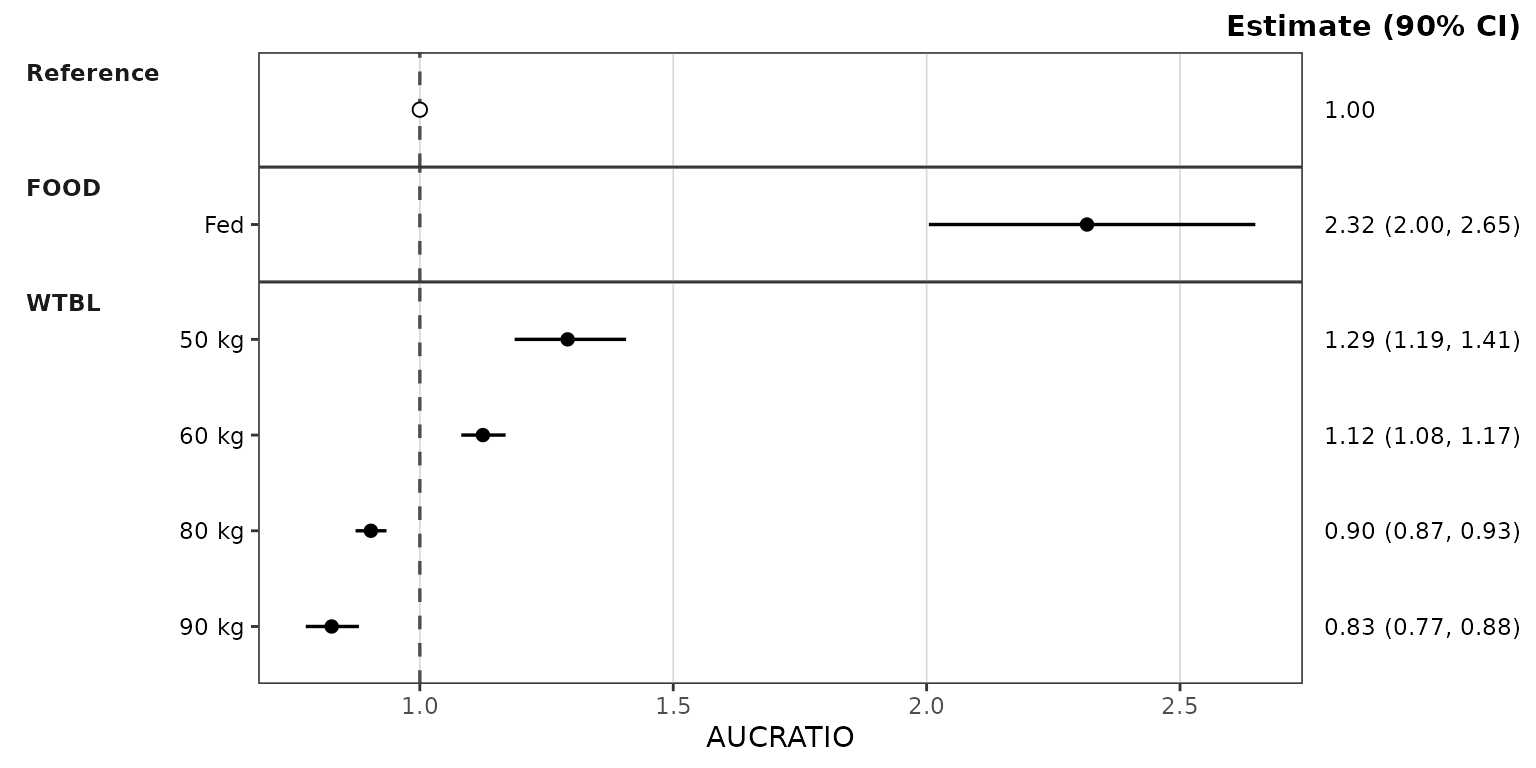
The vertical reference line defaults to
ref = "reference": the reference row’s estimate (1 for a
ratio, the reference exposure for a raw metric). Pass a number to place
it elsewhere, or NULL to suppress it.
Where the reference row is drawn
The plot above has no cov_level_ref, so the reference
row sits in the reference panel at the top. With
cov_level_ref, the reference row is drawn inside each
covariate panel under its reference label instead, so every panel shows
the reference next to the varied levels:
plot_forest(simsum, metric = "AUCRATIO", cov_level_ref = ref_levels)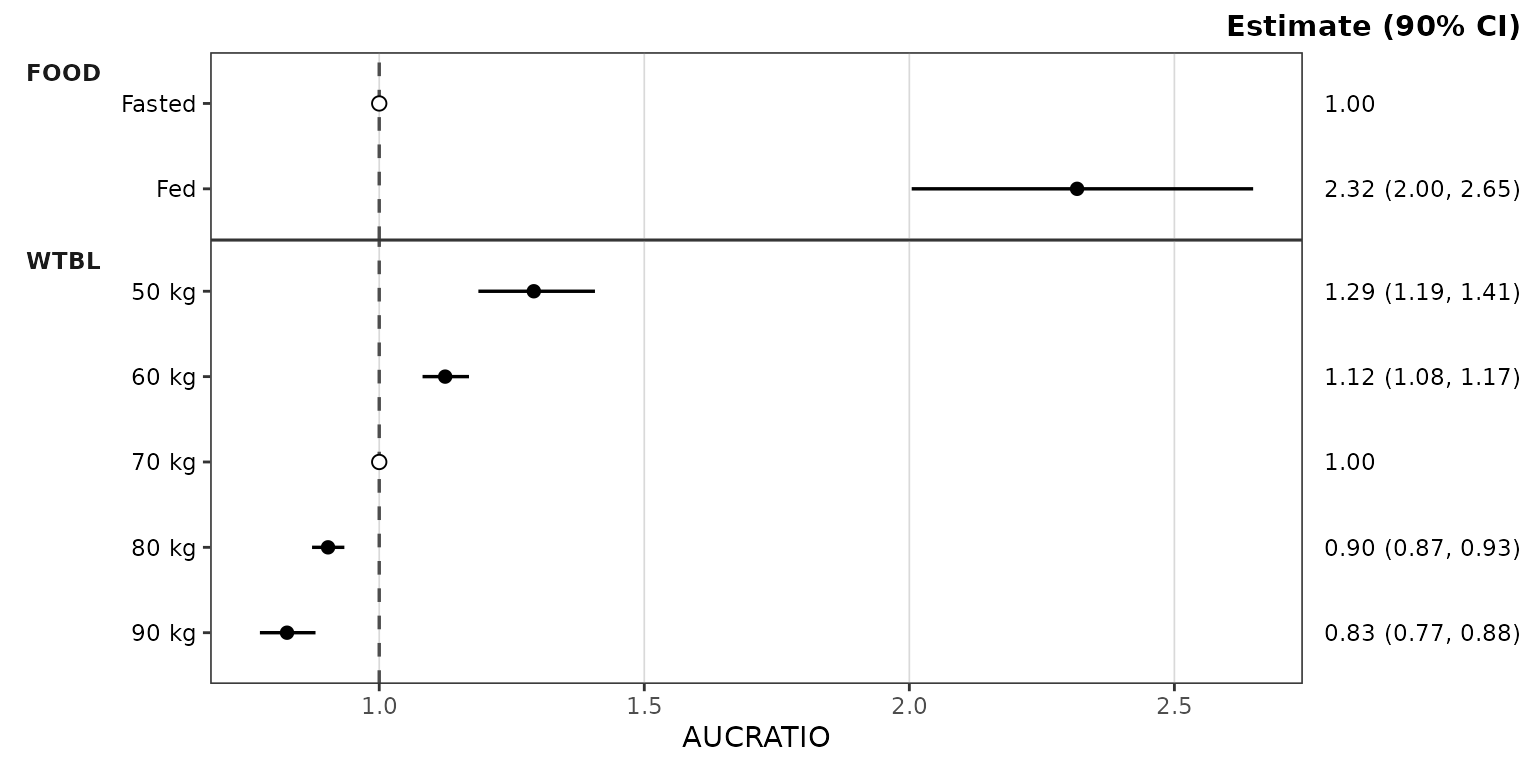
ref_layout switches between the two on the same summary
without re-aggregating: "distributed" (in each covariate
panel, the default when cov_level_ref is given) or
"consolidated" (the reference panel). The
layout column of $stats records which rows
each layout draws.
The equivalence band
ref_band is a numeric vector of length 2 specifying the
bounds of a shaded equivalence band. Its two values are read according
to ref_band_type:
-
"multiplicative"(default): the band isref * ref_band -
"additive": the band isref + ref_band -
"absolute": the band isref_band
A multiplicative band is symmetric only on a log axis, which can be
applied through the style with style_forest(logx = TRUE),
or by adding scale_x_log10() onto the returned
ggplot object.
plot_forest(simsum, metric = "AUCRATIO",
cov_level_ref = ref_levels,
ref_band = c(0.8, 1.25),
style = style_forest(logx = TRUE))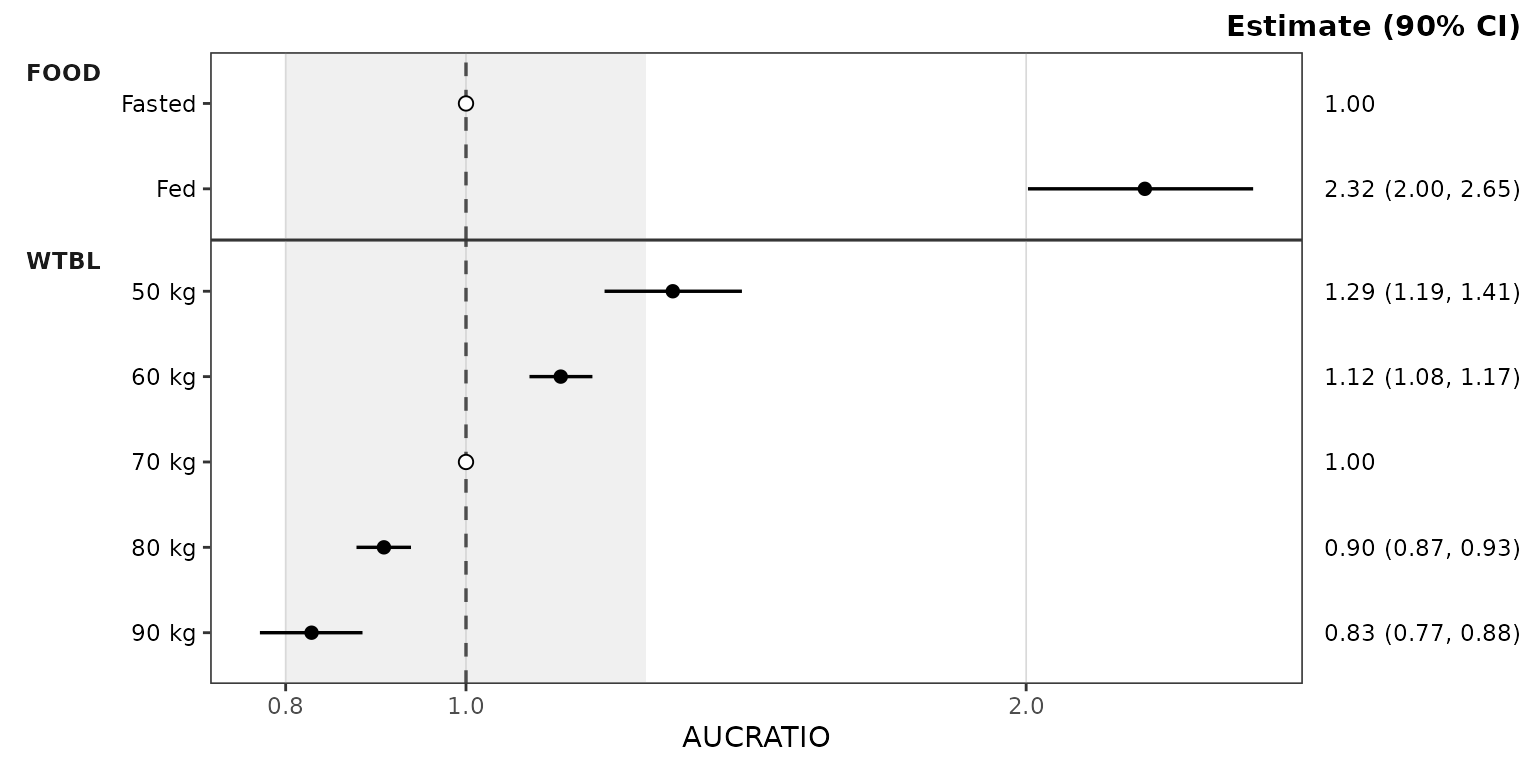 ## Absolute exposure metrics
The same call works for an absolute metric. The reference line
resolves to the reference scenario’s exposure, and a multiplicative band
of c(0.8, 1.25) scales with it, so the plot reads the same
way as the ratio plot but on the exposure scale. The intervals are wider
than for the ratio.
plot_forest(simsum, metric = "AUC",
            cov_level_ref = ref_levels,
            ref_band = c(0.8, 1.25),
            style = style_forest(logx = TRUE))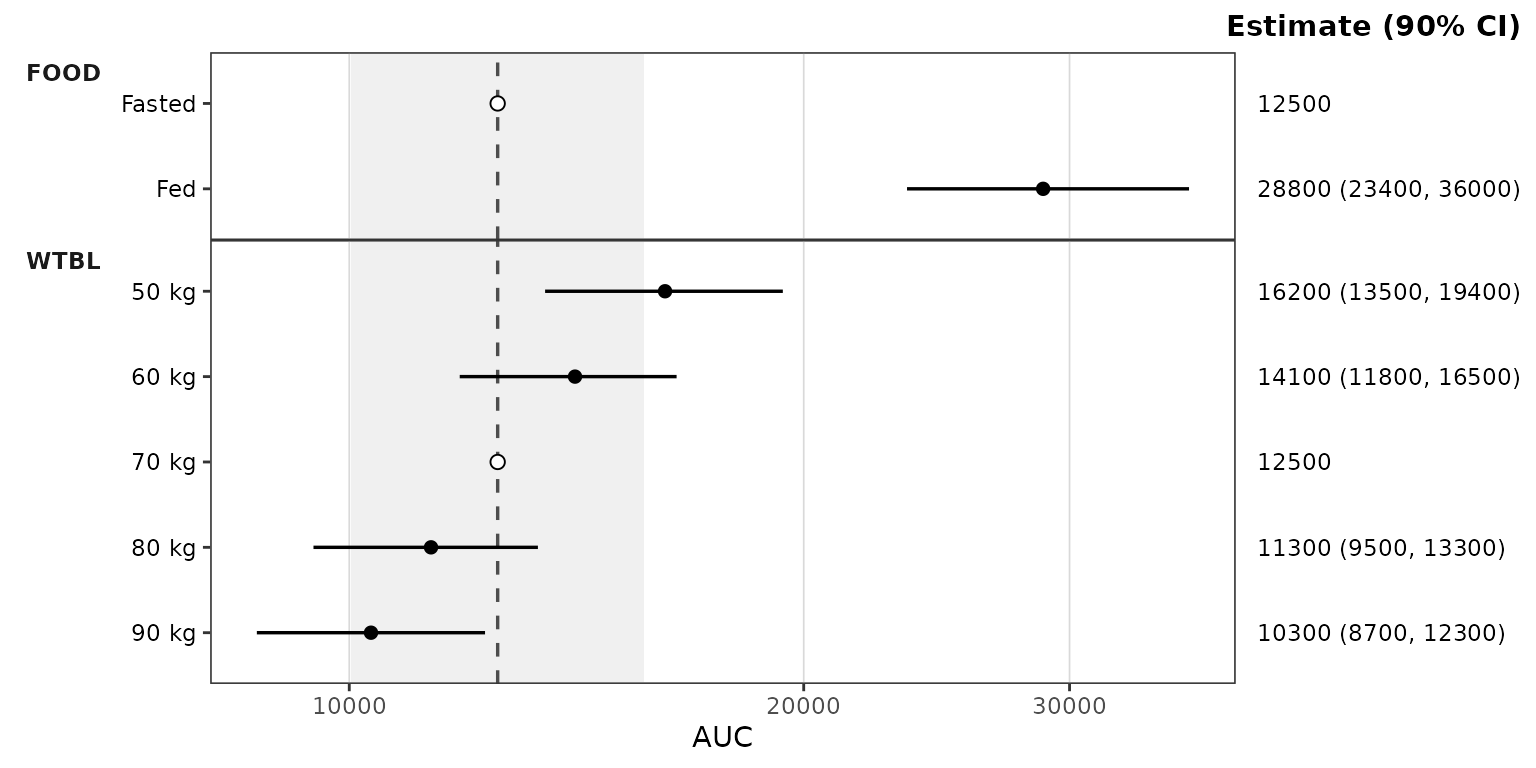
Difference metrics
Metrics on an additive scale, such as percent change from the reference, can be negative or zero, so they need a linear axis and an additive band.
The example derives a percent-change metric from the ratio draws and brackets the reference change of zero with the equivalent of the 0.8 to 1.25 bounds.
data_pchg <- simsum %>%
  filter(metric == "AUCRATIO") %>%
  mutate(metric = "AUCPCHG", value = 100 * (value - 1))

plot_forest(data_pchg,
            cov_level_ref = ref_levels,
            ref_band = c(-20, 25), ref_band_type = "additive")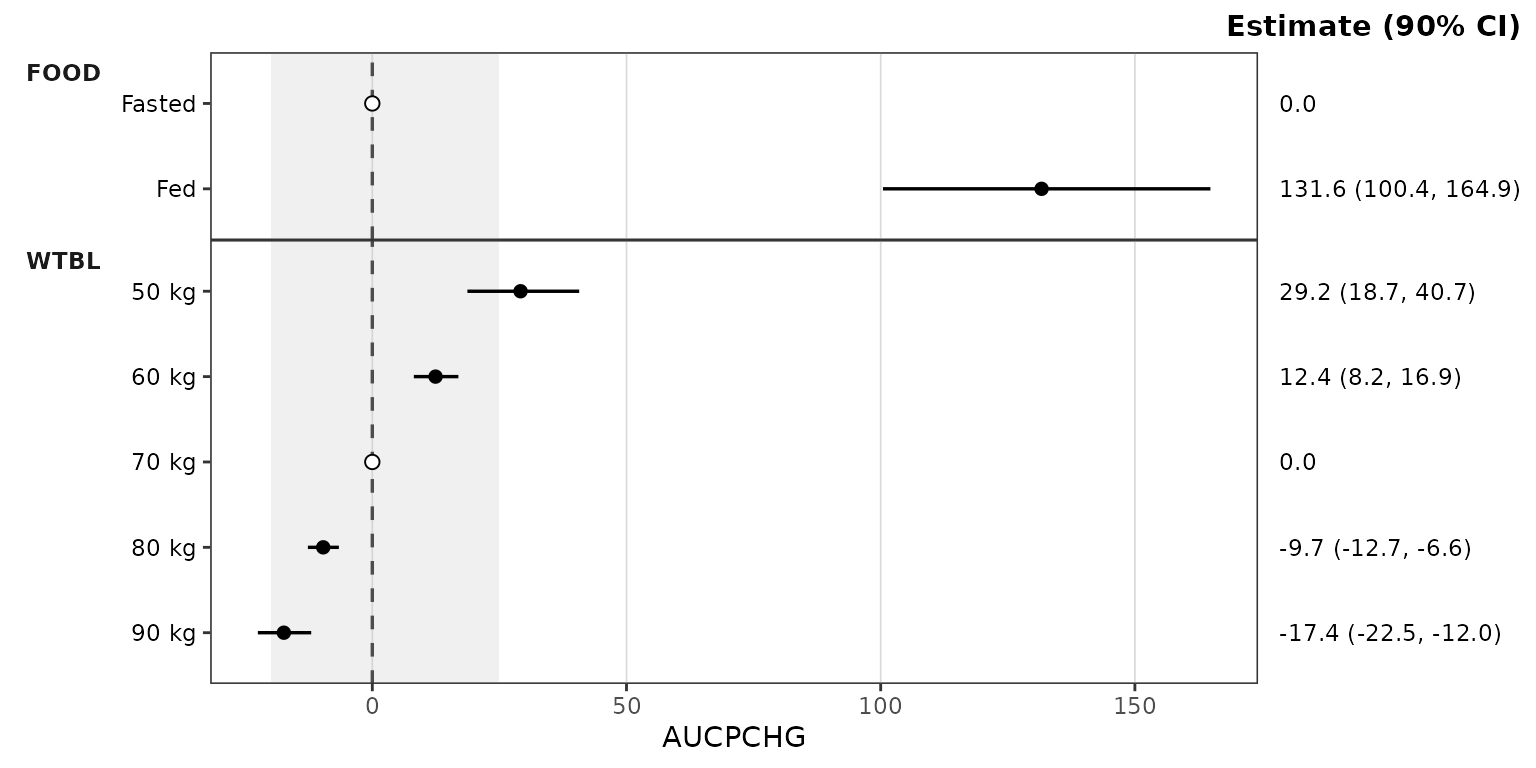
The estimate column header
The header above the estimate column is built from ci
(Estimate (90% CI)). It is the plot subtitle, right-aligned
so it sits on the top edge of the panels, and can be relabelled after
the fact with labs(subtitle = ).
For a ratio metric the conventional label names the quantity rather than the statistic, as in the example below
plot_forest(simsum, metric = "AUCRATIO",
            cov_level_ref = ref_levels,
            ref_band = c(0.8, 1.25),
            style = style_forest(logx = TRUE)) +
  labs(subtitle = "Ratio (90% CI)")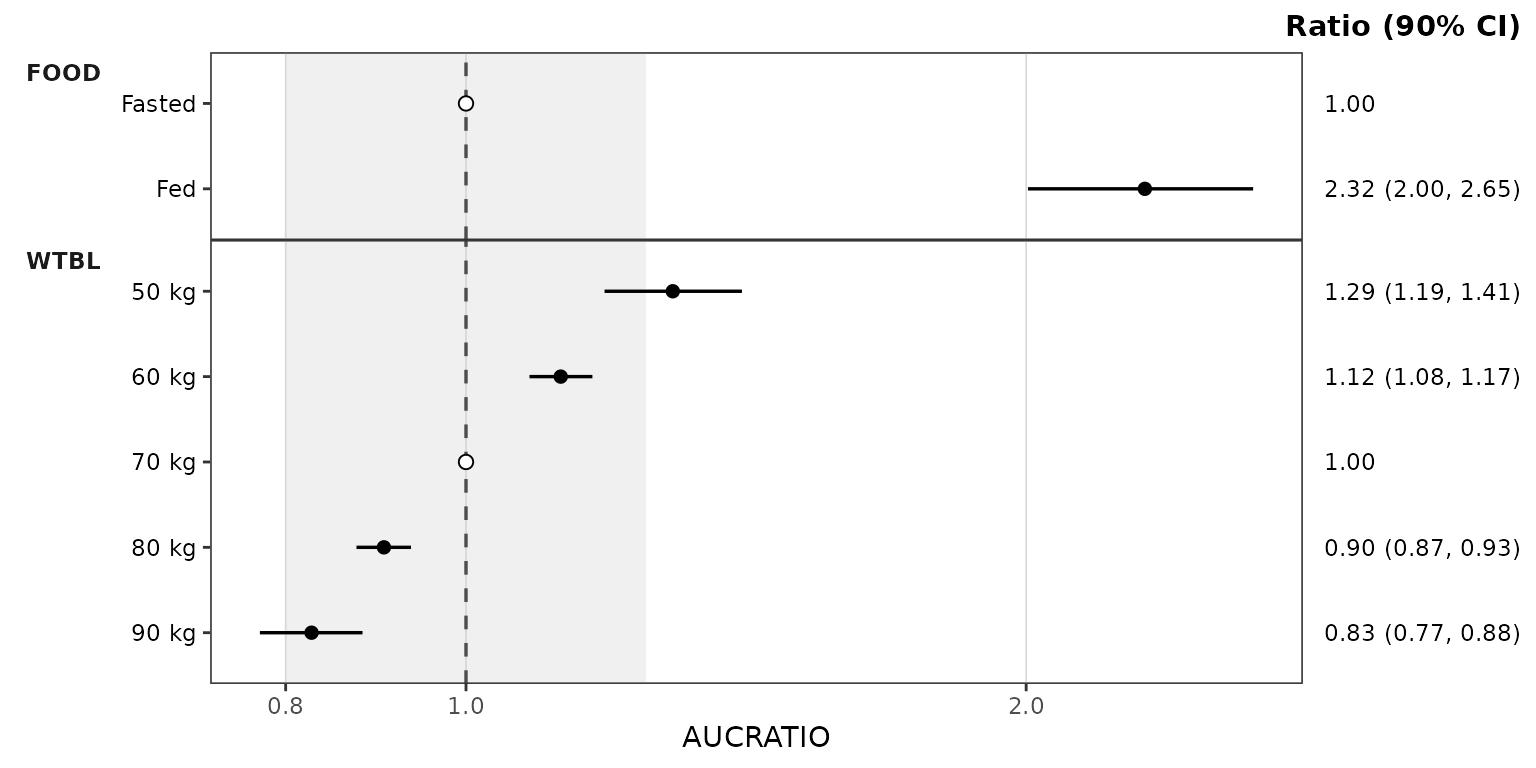
Reusing precomputed stats
plot_forest() also accepts a forest_stats
object directly. This skips the aggregation and is the natural way to
render several metrics from one summary, or to try different
ref_band and style settings on the same
data.
plot_forest(forest_obj, metric = "CMAXRATIO", ref_band = c(0.8, 1.25),
            style = style_forest(logx = TRUE))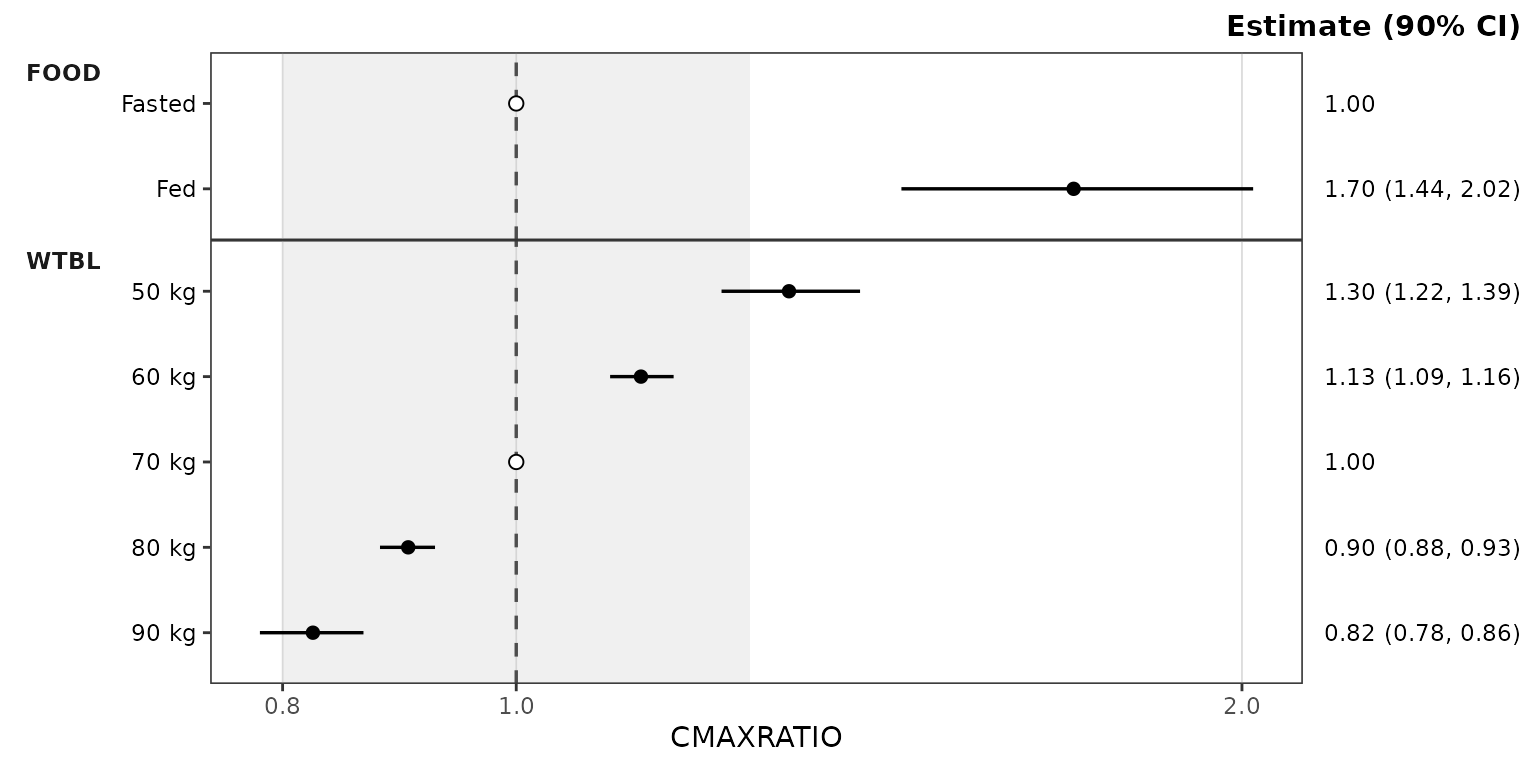
plot_forest(forest_obj, metric = "CMAX", ref_band = c(0.8, 1.25),
            style = style_forest(logx = TRUE))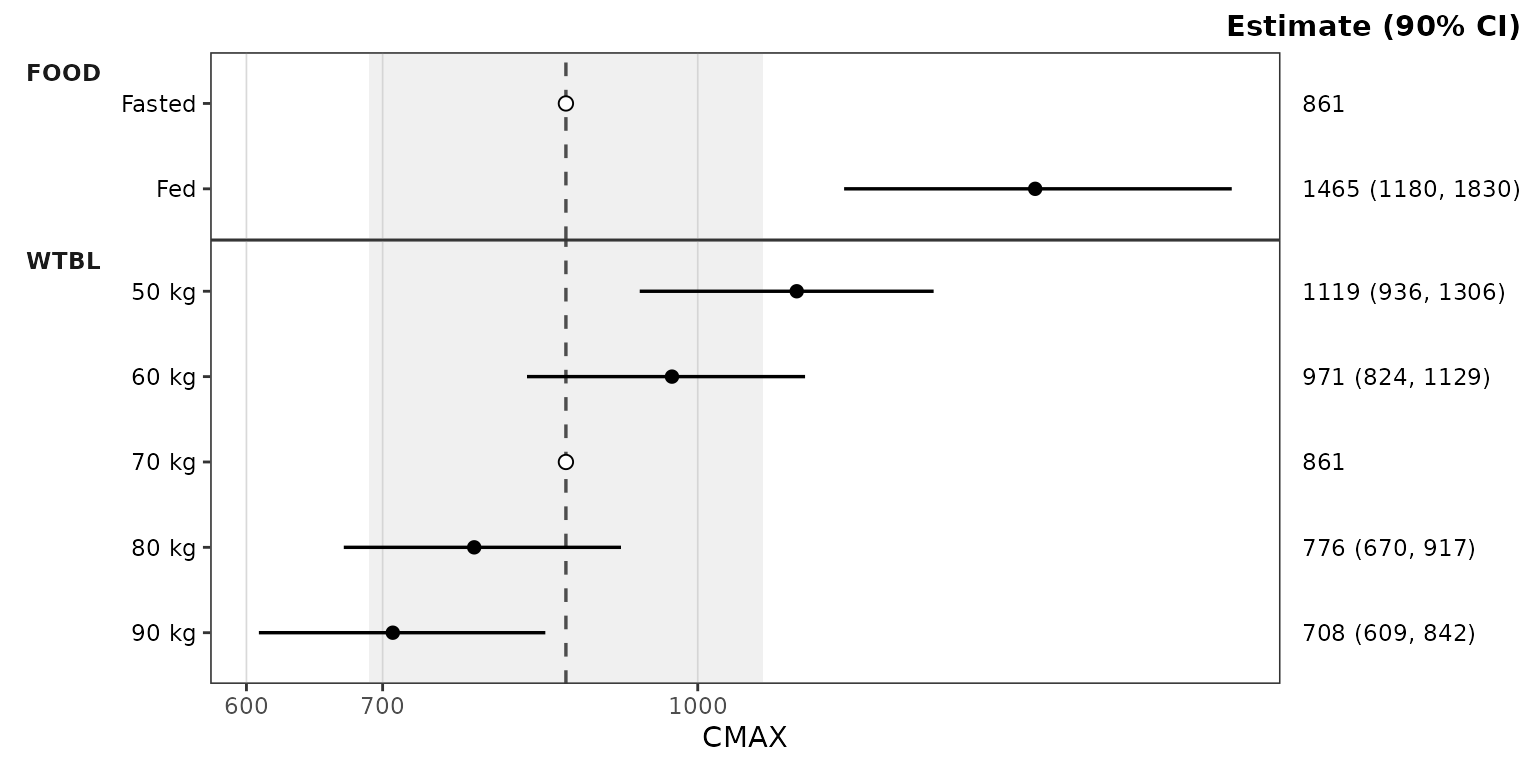
forest_obj was computed with cov_level_ref,
so ref_layout can switch it to the reference panel:
plot_forest(forest_obj, metric = "AUCRATIO", ref_layout = "consolidated",
            ref_band = c(0.8, 1.25), style = style_forest(logx = TRUE))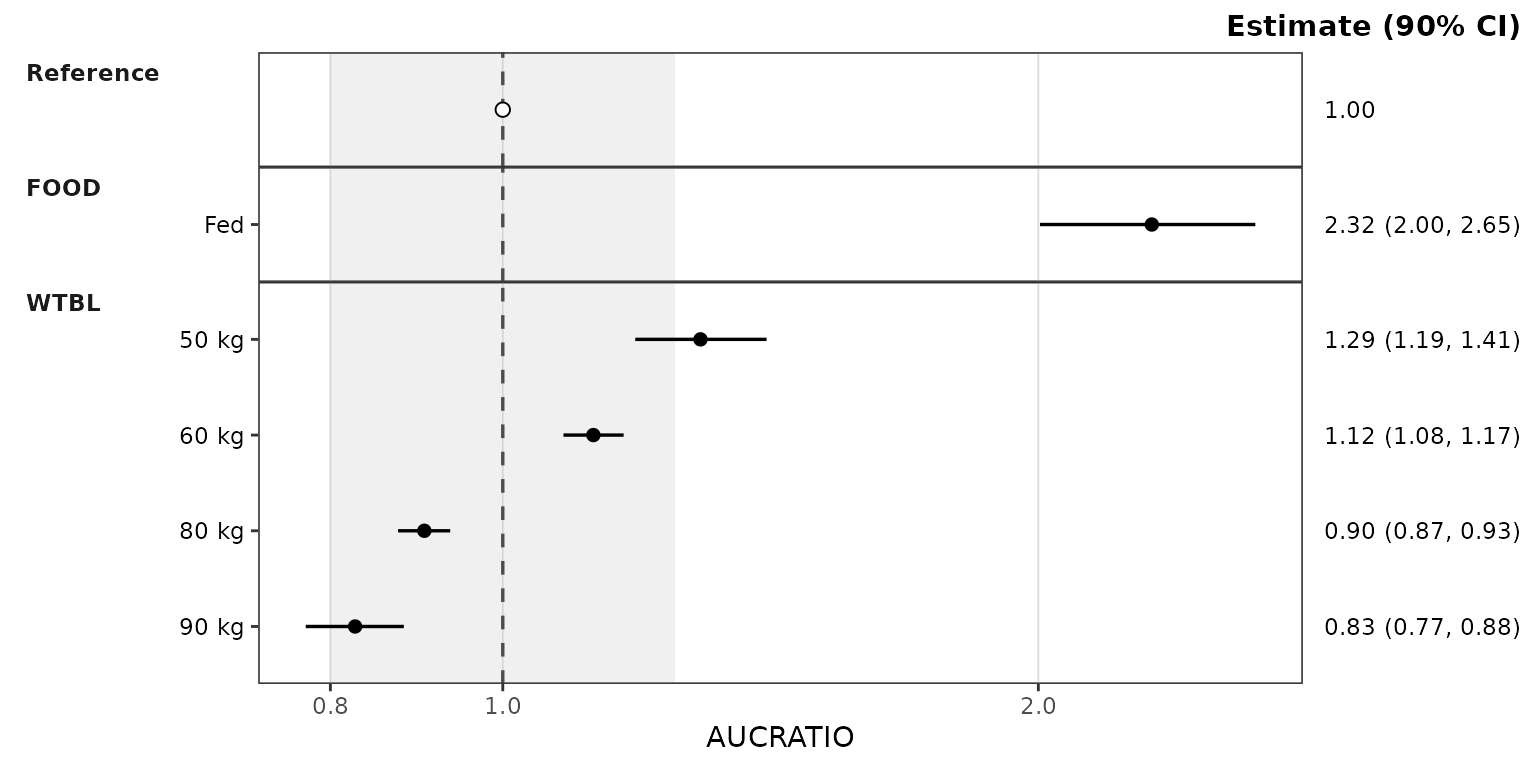
On a precomputed forest_stats, only the plot arguments
(metric, ref, ref_band,
ref_band_type, ref_layout,
show_rep, style) are accepted; summary
arguments such as ci abort with a pointer to
df_forest().
Inspecting the forest_stats object
summary() prints the configuration and one line per
metric: its draw count and each covariate’s levels in plot order, with
reference copies drawn in a covariate panel marked *.
summary(forest_obj)
#> <forest_stats>
#>   stats: 64 rows x 13 columns
#>   config: metric_name_var = metric, metric_value_var = value, cov_name_var = cov_name, cov_level_var = cov_level, ci = 0.9, sigdigits = 3, cov_name_ref = Reference, cov_level_ref = c(FOOD = "Fasted", WTBL = "70 kg")
#>
#>   per metric:
#>     [CMAX]  n = 500  Reference | FOOD: Fasted*, Fed | WTBL: 50 kg, 60 kg, 70 kg*, 80 kg, 90 kg
#>     [CMIN]  n = 500  Reference | FOOD: Fasted*, Fed | WTBL: 50 kg, 60 kg, 70 kg*, 80 kg, 90 kg
#>     [AUC]  n = 500  Reference | FOOD: Fasted*, Fed | WTBL: 50 kg, 60 kg, 70 kg*, 80 kg, 90 kg
#>     [CAVG]  n = 500  Reference | FOOD: Fasted*, Fed | WTBL: 50 kg, 60 kg, 70 kg*, 80 kg, 90 kg
#>     [CMAXRATIO]  n = 500  Reference | FOOD: Fasted*, Fed | WTBL: 50 kg, 60 kg, 70 kg*, 80 kg, 90 kg
#>     [CMINRATIO]  n = 500  Reference | FOOD: Fasted*, Fed | WTBL: 50 kg, 60 kg, 70 kg*, 80 kg, 90 kg
#>     [AUCRATIO]  n = 500  Reference | FOOD: Fasted*, Fed | WTBL: 50 kg, 60 kg, 70 kg*, 80 kg, 90 kg
#>     [CAVGRATIO]  n = 500  Reference | FOOD: Fasted*, Fed | WTBL: 50 kg, 60 kg, 70 kg*, 80 kg, 90 kg
#>   * reference copy in a covariate panel (ref_layout = "distributed")
as.data.frame() returns the stats slot as a
plain data.frame, and is_forest_stats() tests
for the class (strict = TRUE also validates it).
Styling
Plot aesthetics are customized via the style argument
and the style_forest() preset, which returns a
ggstylekit::style_spec(). The series roles are:
-
point— the point estimate -
errorbar— the confidence interval line -
ref_point— the reference row’s estimate (an open circle by default) -
ref_line— the vertical reference line -
ref_band— the shaded equivalence band (fillandalphas)
style_forest()
#> <ggstylekit_style_spec>
#>   colors                 black , black , black , grey30
#>   fill                   white , grey80
#>   linetypes              solid , dashed
#>   alphas                 1.0, 1.0, 1.0, 1.0, 0.3
#>   shapes                 16, 21
#>   sizes                  2.2, 2.2
#>   linewidths             0.6, 0.6
#>   point_color            NULL
#>   point_alpha            NULL
#>   point_size             NULL
#>   point_shape            NULL
#>   line_color             NULL
#>   line_alpha             NULL
#>   line_linetype          NULL
#>   line_linewidth         NULL
#>   line_fill              NULL
#>   errorbar_color         NULL
#>   errorbar_alpha         NULL
#>   errorbar_linetype      NULL
#>   errorbar_linewidth     NULL
#>   errorbar_width         NULL
#>   errorbar_fill          NULL
#>   bar_fill               NULL
#>   bar_color              NULL
#>   bar_alpha              NULL
#>   bar_linewidth          NULL
#>   area_fill              NULL
#>   area_color             NULL
#>   area_alpha             NULL
#>   area_linewidth         NULL
#>   box_fill               NULL
#>   box_color              NULL
#>   box_alpha              NULL
#>   box_linewidth          NULL
#>   title                  NULL
#>   xlabel                 NULL
#>   ylabel                 NULL
#>   caption                NULL
#>   xlims                  NULL
#>   ylims                  NULL
#>   logx                   NULL
#>   logy                   NULL
#>   xbreaks                NULL
#>   ybreaks                NULL
#>   xminor_breaks          NULL
#>   yminor_breaks          NULL
#>   xtick_labels           NULL
#>   ytick_labels           NULL
#>   xorder                 NULL
#>   yorder                 NULL
#>   equal_axis             NULL
#>   legends                NULL
#>   legend.position        none
#>   legend.title.position  NULL
#>   legend_nrow            NULL
#>   legend_ncol            NULL
#>   legend.title.hjust     NULL
#>   caption_hjust          NULL
#>   fill_alpha             NULL
#>   facet                  NULL
#>   facet_scales           NULL
#>   facet_nrow             NULL
#>   facet_ncol             NULL
#>   theme                  <ggplot2 theme>
A typical override example is provided below using the style to change the point sizes and the colors of the reference line and band:
plot_forest(forest_obj, metric = "AUCRATIO", ref_band = c(0.8, 1.25),
            style = style_forest(shapes = c(point = 18),
                                 sizes = c(point = 3),
                                 colors = c(ref_line = "firebrick"),
                                 fill = c(ref_band = "steelblue"),
                                 alphas = c(ref_band = 0.15),
                                 logx = TRUE))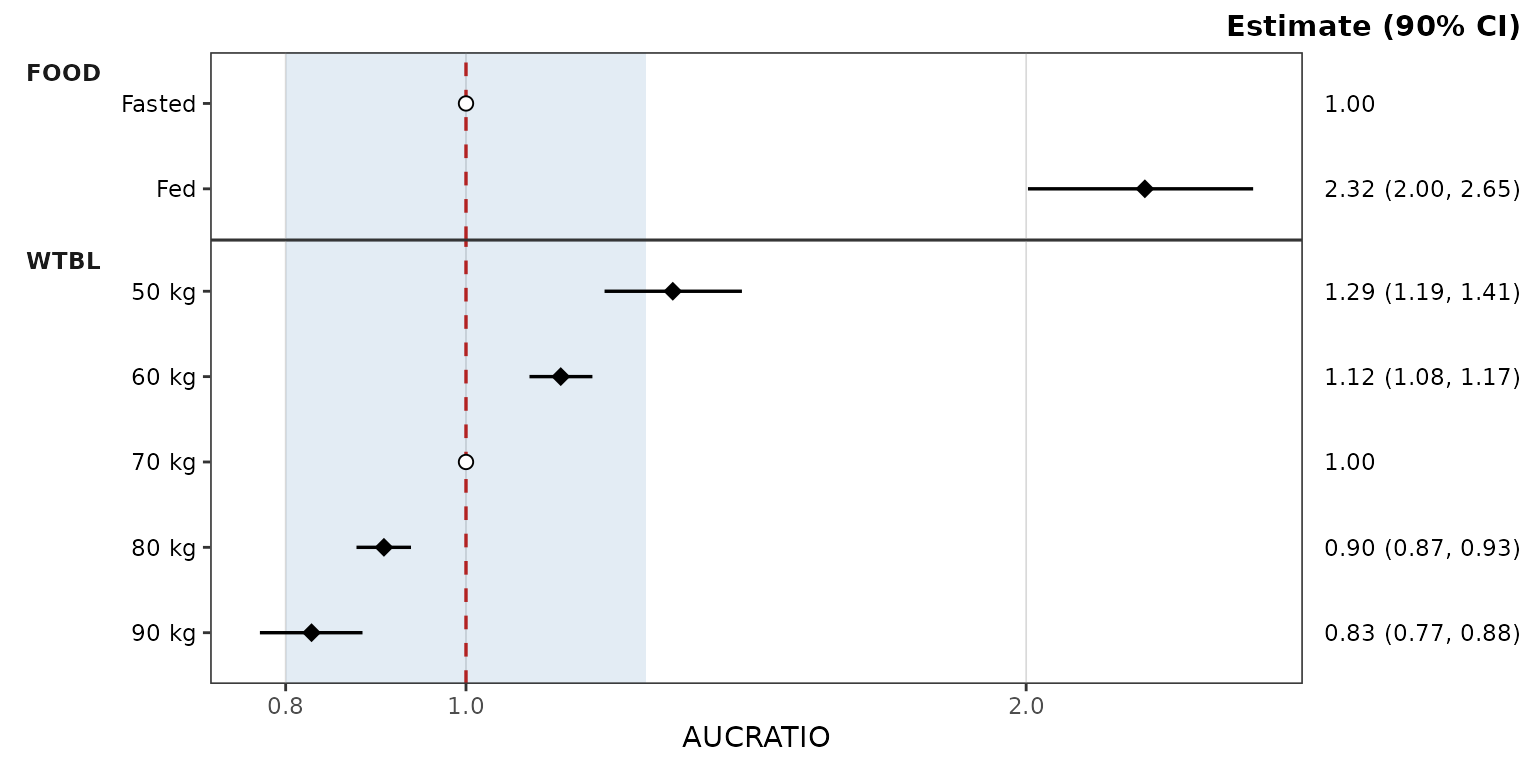
Per-covariate coloring
Coloring by covariate is opt-in through the same colors
map: add entries keyed by covariate name.
When at least one plotted covariate is named, points and error bars are colored by covariate and the legend is suppressed, since the panel strips already label each covariate. Covariates without an entry take colours from the house palette.
plot_forest(forest_obj, metric = "AUCRATIO", ref_band = c(0.8, 1.25),
            style = style_forest(colors = c(FOOD = "darkgreen", WTBL = "darkblue"),
                                 logx = TRUE))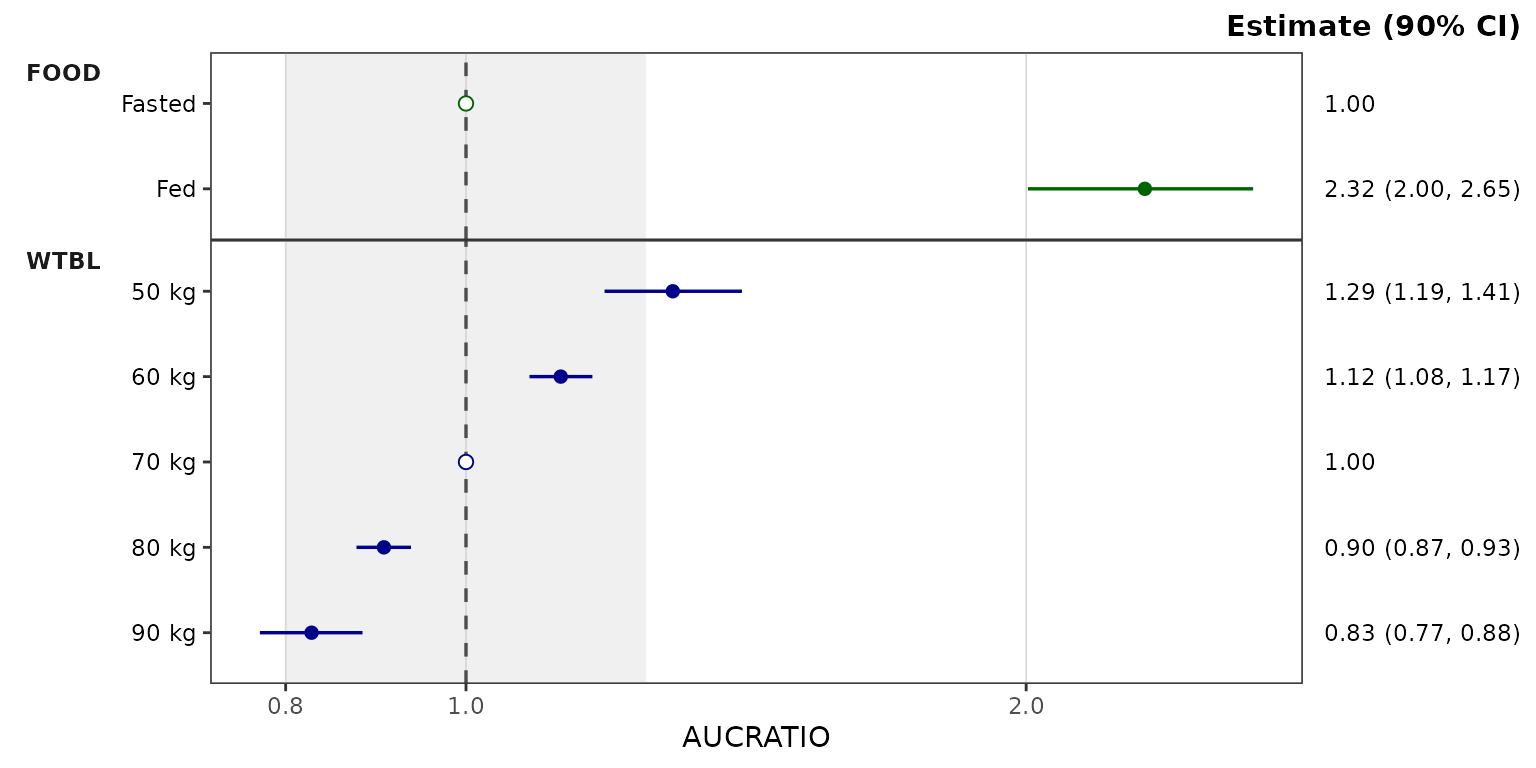
The facet layout is fixed by the renderer (facet_grid()
rows by covariate, strips outside the y-axis), so the style’s
facet* fields are ignored.
The estimate column is right-hand axis text styled through the
theme’s axis.text.y.right element, and its header is the
plot subtitle (plot.subtitle). The x-axis label defaults to
the metric and can be replaced with the style’s xlabel
field or labs(x = ); a title can be added with the
title field or labs(title = ).
The preset examples below share one log x-axis
(scale_x_log10() with fixed limits) so the looks can be
compared directly.
pmforest styling
style_forest_pmforest() reproduces the default look of
Metrum’s pmforest
package: diamonds filled per covariate from the ggplot2 hue palette with
black outlines, a dot-dash reference line, and grey vertical gridlines.
It is a regular preset, so its fields can be overridden the same
way.
plot_forest(forest_obj, metric = "AUCRATIO", ref_band = c(0.8, 1.25),
            style = style_forest_pmforest()) +
  scale_x_log10(limits = c(0.5, 5), breaks = c(0.5, 0.8, 1, 1.25, 2, 3, 4, 5))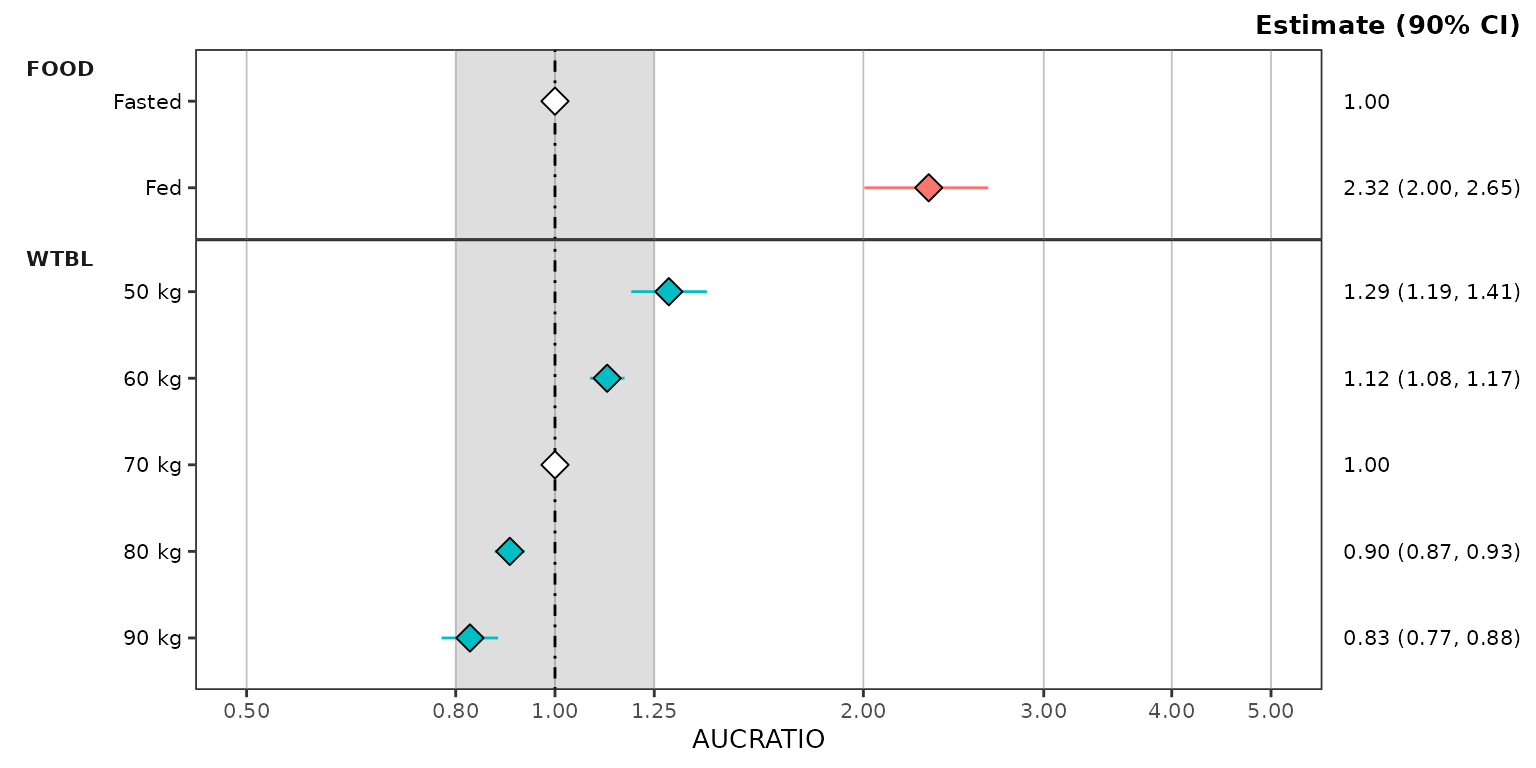
coveffectsplot styling
style_forest_coveffectsplot() reproduces the default
look of the forest_plot() function of the coveffectsplot
package: blue points on thick blue intervals, a dashed reference line,
grey gridlines on both axes, and grey-filled covariate strips.
plot_forest(forest_obj, metric = "AUCRATIO", ref_band = c(0.8, 1.25),
            style = style_forest_coveffectsplot()) +
  scale_x_log10(limits = c(0.5, 5), breaks = c(0.5, 0.8, 1, 1.25, 2, 3, 4, 5))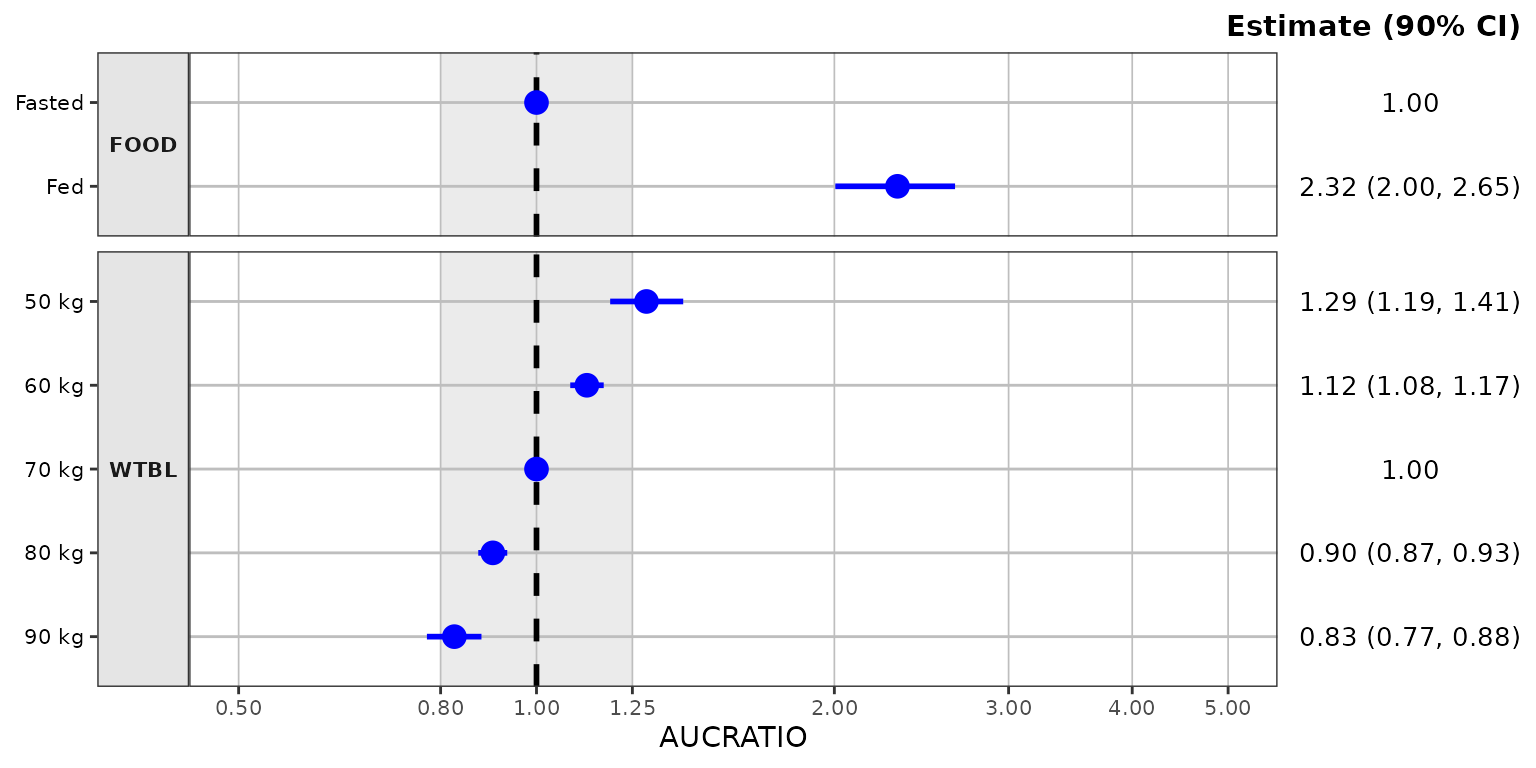
PMXForest styling
style_forest_pmxforest() reproduces the default look of
the forestPlot() function of Pharmetheus’ PMXForest package,
the forest plot of the FREM workflow: black points on uncapped black
intervals, a dotted reference line, and the grey
theme_grey() panel.
plot_forest(forest_obj, metric = "AUCRATIO", ref_band = c(0.8, 1.25),
            style = style_forest_pmxforest()) +
  scale_x_log10(limits = c(0.5, 5), breaks = c(0.5, 0.8, 1, 1.25, 2, 3, 4, 5))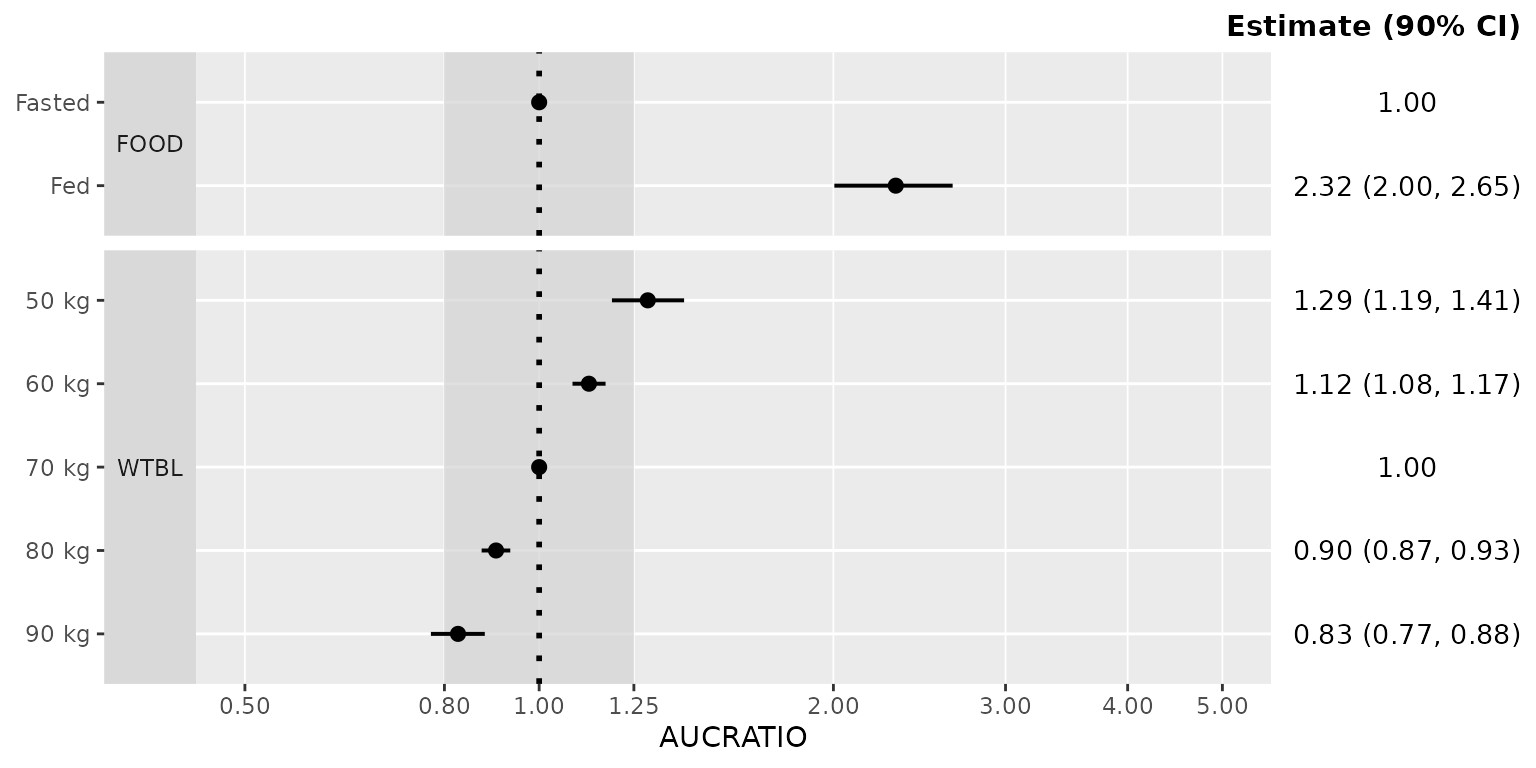
Pumas styling
style_forest_pumas() reproduces the look of the
table_forest_plot() function of Pumas:
diamonds and capped error bars colored per covariate, a dashed reference
line, and an open panel without gridlines.
plot_forest(forest_obj, metric = "AUCRATIO", ref_band = c(0.8, 1.25),
            style = style_forest_pumas()) +
  scale_x_log10(limits = c(0.5, 5), breaks = c(0.5, 0.8, 1, 1.25, 2, 3, 4, 5))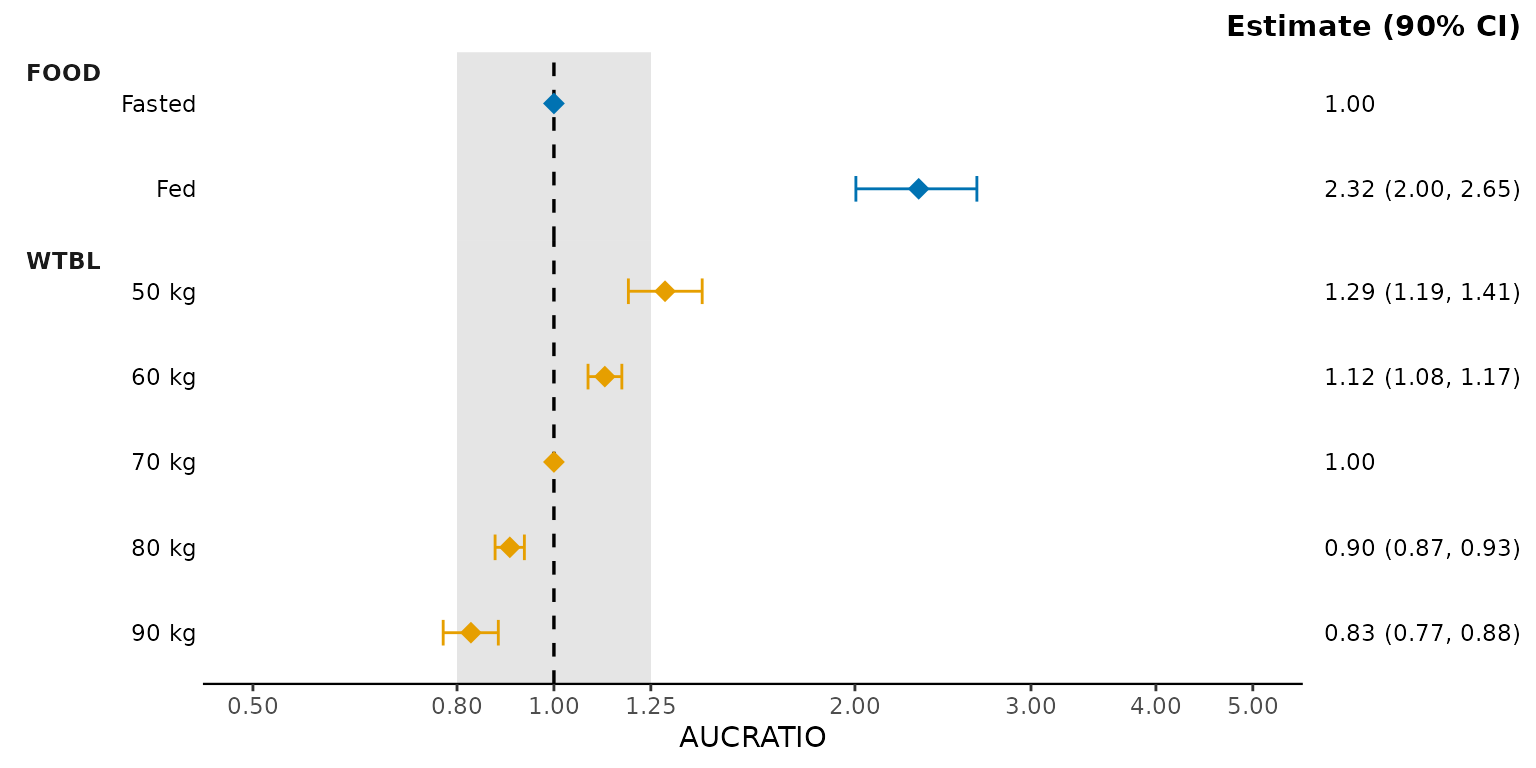
For a deeper treatment of the styling system —
style_spec() fields, per-role maps, and post-hoc
reveal() — see the Plot Styling
and Aesthetics vignette.
See also
-
Dose-Proportionality Workflow —
the sibling dual-mode pipeline (
df_doseprop()/plot_doseprop()) for power law regression of exposure versus dose. -
Visual Predictive Check Workflow —
simulation-based model evaluation with
df_vpcstats()andplot_vpc_cont(). -
Plot Styling and Aesthetics — the
style_*()presets,style_spec()fields and per-role maps, and post-hocreveal()for customizing plot output.